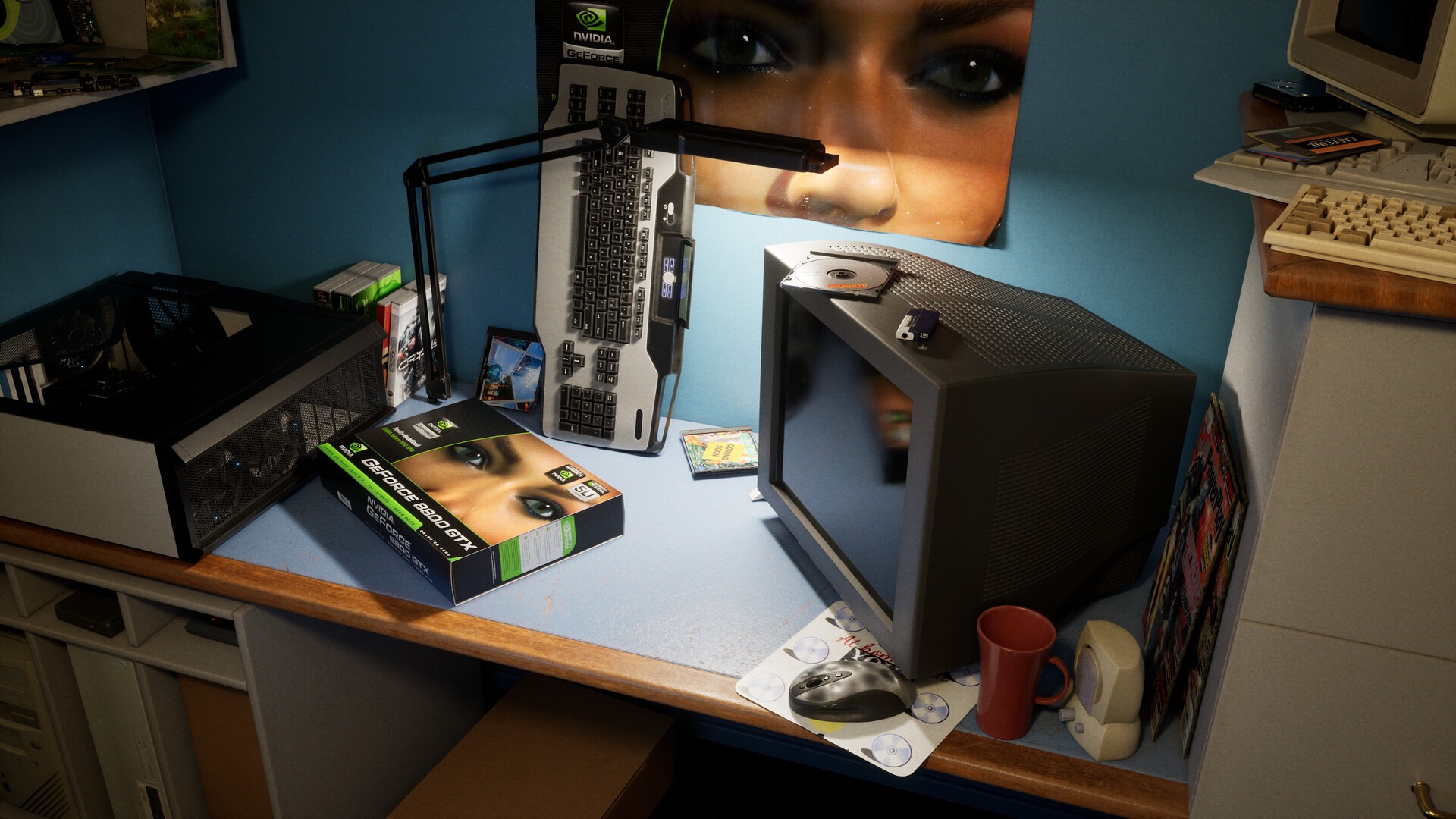
PC enthusiasts just received a playful dose of retro warmth wrapped inside intense path tracing via a free GeForce 8800 GTX showcase live on Steam. Named 20 Years of a Legend, this interactive diorama recreates a 2006 gaming room for unboxing a classic G80 board. Ironically, admiring vintage hardware under modern ray tracing demands minimum RTX 4070 silicon while recommending an RTX 5080. Meanwhile, Nvidia rolled out Game Ready Driver 621.14 carrying fresh neural rendering optimizations.
Launching this anniversary tribute spotlights how radically desktop graphics evolved across twenty Novembers since Team Green released its flagship. Crafted by Unreal Engine technical artist Dylan Browne with Nvidia engineering input, every CRT glow reflection computes real path tracing. Before downloading heavy benchmarks, run our Windows 11 low-latency FPS boost checklist so background tasks stay silent. First, let us unpack why simulating a 2006 desktop pushes 2026 Blackwell cards so hard.

Dylan Browne’s free Steam build celebrates 20 years of the GeForce 8800 GTX while requiring RTX 4070 minimum, RTX 5080 recommended, DLSS 4.5, and Driver 621.14.
- Historic 2006 Milestone: Salutes the Nov 2006 G80 GPU pairing unified shader units with 768MB GDDR3 and DirectX 10.
- Heavy Modern Specs: Calls for RTX 4070 + 32GB system RAM baseline, recommending RTX 5080 for full RTX Mega Geometry clarity.
- DLSS 4.5 Showcase: Highlights neural Ray Reconstruction alongside Dynamic Multi Frame Generation inside NVIDIA App menus.
- Driver 621.14 Optimizations: Delivers frame-pacing stability plus GPU App Prioritisation inside updated NVIDIA software.
Why the Original GeForce 8800 GTX Changed Desktop Graphics Forever
Back in November 2006, few components altered 3D rendering architecture quite like Team Green’s G80 flagship processor. Earlier graphics cards trapped shading code inside rigid pixel and vertex pipes that choked under complex atmospheric shaders. Instead, Nvidia unified 128 stream processors running decoupled shader clocks beside 768MB GDDR3 across a massive 384-bit bus. Consequently, Crysis and DirectX 10 showcases unlocked destructible physics and moody foliage shadows previously unimaginable.
Dylan Browne’s interactive Steam scene leans warmly into tactile mid-2000s rituals from cardboard retail packaging to beige keyboards. Players open shrink wrap, admire classic green silicon under warm CRT light, and slot the dual-fan card into a period tower. Tracing two decades of silicon explains the competitive landscape covered in our NVIDIA Blackwell vs AMD RDNA GPU market comparison. Indeed, twenty years multiplied transistor density dozens of times over while pivoting from raw rasterization toward AI denoising.
Seeing crisp acrylic reflections bounce across period software boxes creates instant nostalgia for anyone who built rigs around Windows Vista. Every small sticker, plastic wrap fold, and cathode fan grill looks remarkably grounded thanks to zero baked static shadow maps. Even vintage optical mice glide softly over glossy desk pads inside light pools bouncing organically off bedroom posters.
Path Tracing Math: Why a 2006 Bedroom Taxes an RTX 5080
Clean press stills fool casual onlookers into expecting gentle frame rates from a single-room downloadable tribute. In practice, simulating genuine phosphor bounce light, translucent blister packaging, and desk dust requires dense multi-bounce rays. Moreover, RTX Mega Geometry subdivides intricate heatsink fins and manuals into dense micro-polygons without visible LOD stepping. Therefore, system checks list an RTX 4070 paired with 32GB memory strictly as baseline threshold hardware.
Unlike large open-world maps trading lighting density for kilometer draw distances, small showcase dioramas stack every volumetric ray upward. Transparent acrylic PC side panels refract desk lamp beams cleanly onto brushed metal heat pipes right beside printed manual ink. Furthermore, switching Ray Reconstruction off instantaneously exposes fuzzy shimmer across classic glossy stickers, spotlighting modern denoising leaps clearly. Gamers testing ultra-wide monitors should budget ample Frame Generation headroom to stay above comfortable 60 FPS motion smoothness. Equally impressive, realistic camera depth-of-field rack focuses simulate classic mid-2000s tech magazine product photography inside a live game engine. Watch subtle heat haze shimmer lightly beside copper radiator fins while virtual ambient light fills bedroom corners without artificial fill lamps. Hardware collectors especially appreciate tiny nostalgic touches across vintage motherboard expansion slots and glossy instruction booklets. Moreover, instant side-by-side toggles let veteran builders compare raw 2006 raster lighting directly against modern path tracing. Consequently, every nostalgic studio reflection stands out cleanly.
| Hardware / Software Component | 2006 G80 Hardware Reality | 2026 Steam Path-Traced Showcase Target |
|---|---|---|
| Core Architecture | G80 Unified Shader (90nm, 128 SP) | Ada / Blackwell RT & Tensor (Min RTX 4070 / Rec RTX 5080) |
| Video Memory Pool | 768MB GDDR3 (384-bit bus) | 12GB-16GB+ GDDR6X/GDDR7 + 32GB System RAM |
| DirectX / API Pipeline | DirectX 10 Rasterization Debut | DX12 Ultimate Full Path Tracing + Mega Geometry |
| Upscaling Stack | Native 1280×1024 / 1600×1200 CRT | DLSS 4.5 + Ray Reconstruction + Dynamic Multi Frame Gen |
| Driver Branch Target | ForceWare Windows Vista Beta | NVIDIA Game Ready Driver 621.14 + NVIDIA App |
Best Driver 621.14 Setup for the GeForce 8800 GTX Demo
Before launching the showcase, clean-install Game Ready Driver 621.14 so DLSS 4.5 shader graphs compile properly right at startup. Driver 621.14 polishes Dynamic Multi Frame Generation cadence and sharpens Ray Reconstruction, suppressing noisy light trails across glossy cardboard surfaces. Next, enter NVIDIA App Graphics preferences, select the demo entry, and ensure GPU App Prioritisation remains active. Closing unused hardware-accelerated web browser tabs also saves critical VRAM headroom on 12GB RTX 4070 rigs.
Three Quick Benchmarks to Test Inside the 2006 Desk Scene
- Check Multi Frame Gen Cadence: Flip between 2x and 3x/4x frame output near desk lamp beams to gauge cursor snap.
- Favor DLSS Balanced: Balanced holds embossed box typography far crisper than Ultra Performance across 1440p OLED glass.
- Track Memory Ceiling: Open the Alt+R metrics HUD to confirm VRAM load sits safely below 90% capacity on 12GB GPUs.
- Keep Reflex Active: Ensure Low Latency Reflex stays toggled on whenever driving elevated frame generation ratios.
What the GeForce 8800 GTX Diorama Proves About Path Tracing
Exploring this detailed tribute spotlights the widening architectural divide between modern living-room consoles and enthusiast desktops. While neural upscalers bridge visual gaps well across everyday games, uncompromised multi-bounce path tracing devours dedicated tensor silicon. Stack that PC muscle directly beside our PS5 Pro vs PC ray-tracing telemetry showdown to see exactly where hardware splits. Above all, Dylan Browne packaged hardware history into an awesome free real-world stress test for 2026 RTX builds.
Frequently Asked Questions
Is the GeForce 8800 GTX anniversary demo free to download on Steam?
Yes. This interactive tribute built by Dylan Browne with Nvidia technical support downloads free on Steam for Windows RTX systems.
Can non-RTX GPUs run the anniversary demo smoothly?
No. Because lighting depends strictly on real-time path tracing and RTX Mega Geometry, Nvidia lists RTX 4070 plus 32GB system RAM as minimum baseline.
What does Game Ready Driver 621.14 enhance here?
Driver 621.14 optimizes DLSS 4.5 Ray Reconstruction stability, Dynamic Multi Frame Generation timing, and NVIDIA App GPU App Prioritisation.
Why was this November 2006 flagship GPU considered revolutionary?
Launching in November 2006, the original GeForce 8800 GTX debuted Nvidia’s G80 unified shader architecture alongside DirectX 10 programmability.
Related posts:
 Sunday Pro PC & Mobile Hardware Hacks: How to Unlock 0.1ms Rapid Trigger Strafe Stopping, 1600 DPI Sensor Calibration & Unreal Engine 5 Stutter Fixes in Phantom Blade Zero
 The Ultimate Windows 11 & PS5 Pro Gaming Optimization Guide: Low Latency Mode, 100GB Shader Cache Fix & Zero 1% Low Stutters
 Handheld Gaming PC Esports Shootout (Late 2026): Steam Deck OLED vs ASUS ROG Ally X vs Lenovo Legion Go
 Windows 11 Gaming FPS Boost & Latency Hacks (2026): HAGS, Nvidia Ultra, AMD Anti-Lag & VBS Guide